The information provided in this article refers only to Tern electric bikes equipped with the Bosch Smart System and ConnectModule.
If your Tern bike is equipped with the Bosch ConnectModule, you can turn on GPS tracking through the eBike Flow app. GPS tracking shows your bike’s location in real time and can help you recover it more easily if it is ever stolen. Read on to learn how to enable it and get a few helpful tips.
How to enable GPS Tracking on your Tern bike
- Download the Flow app via the App Store or Google Play on your smartphone.
- Through the app, create a new SingleKey ID* or sign in if you already have one.
- Follow instructions to set up your profile and link your bike to your SingleKey ID.
- Then, connect your bike to the Flow app via Bluetooth using these steps:
- Go to Settings.
- Tap Connect eBike.
- Select your bike’s control unit.
- Tap Continue.
- Press and hold the on/off button on the control unit until it starts blinking.
- The connection is complete when you see “That worked like a charm!”.
- Go to the homepage to subscribe to the Flow+ service. You can choose between annual or monthly billing.
- After subscribing to Flow+, go to Settings and toggle Lock & Alarm to the right.
- The eBike Lock, Alarm, and Location Tracking are now enabled and will activate automatically when you switch off your bike.
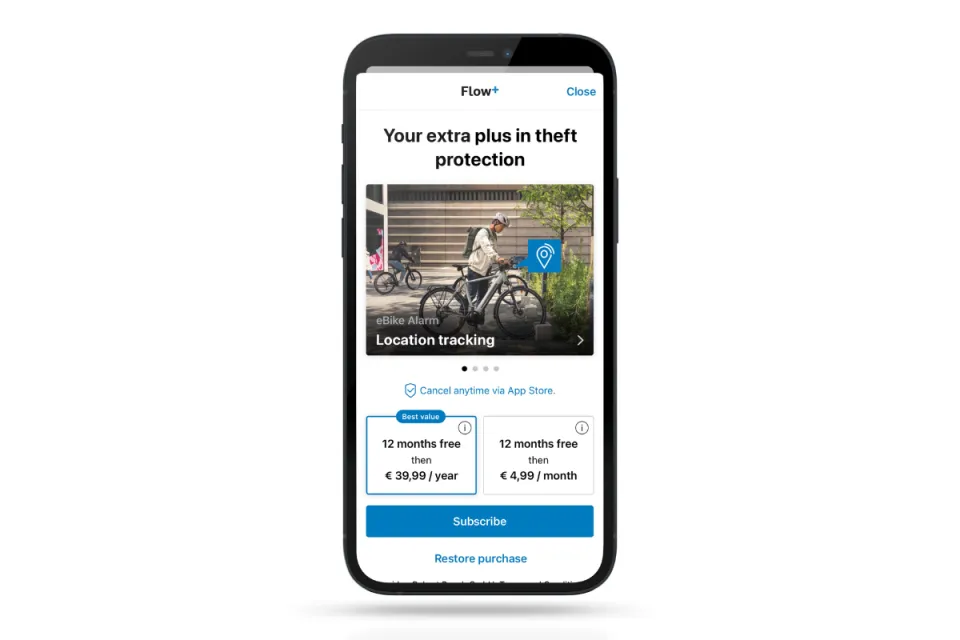
eBike Flow app sign-up page
See more details: eBike Flow App Basic Settings for Tern Bikes
*Since April 2023, Bosch has used SingleKey as a platform for its customers to access their Bosch account, but you can still log in with your Bosch ID credentials.
Some tips to keep your bike safe
- Look for angle grinder-resistant bike locks with a high security rating.
- If you’re parking your bike and leaving it unattended, use multiple locks to secure it.
- Remove the battery and display if possible.
- Activate the eBike Alarm and Location Tracking in the Flow app.
- Sign up your bike with a bike registry, such as Bike Index, which has a global reach. A bike registry creates a verified record of the bike and its owner, which increases the chances of identifying and recovering the bike if it ever gets stolen.
See also: Theft protection for eBikes
GPS Tracking Feature — Terms, Subscription & Privacy Information
Bikes equipped with the Bosch ConnectModule benefit from GPS-based location tracking through Bosch’s “eBike Flow” app.
The GPS service is operated solely by Bosch eBike Systems. The first year of service is included at no charge. After the first year, an annual subscription fee set and billed by Bosch applies. Owners can activate, renew, or cancel their subscription directly through the Bosch app or website. Service availability may vary by region and mobile network access.
While the GPS module can show the last known location of the bicycle, neither Tern nor Bosch can guarantee recovery of a lost or stolen bike. If your bike is stolen, contact local law enforcement and provide any location information available in the Bosch app. Neither Tern nor Bosch is responsible for loss, damage, or failure of recovery.
Location data is processed by Bosch under its privacy policy. Tern does not have access to individual GPS-location data unless explicitly shared by the owner for support purposes. The bike owner controls activation and deactivation of the module and subscription. Do not activate GPS tracking without the consent of the current owner or rider.
For technical support with the GPS feature, contact Bosch via their website. For questions about your Tern bicycle, contact Tern Customer Support via our contact form.